
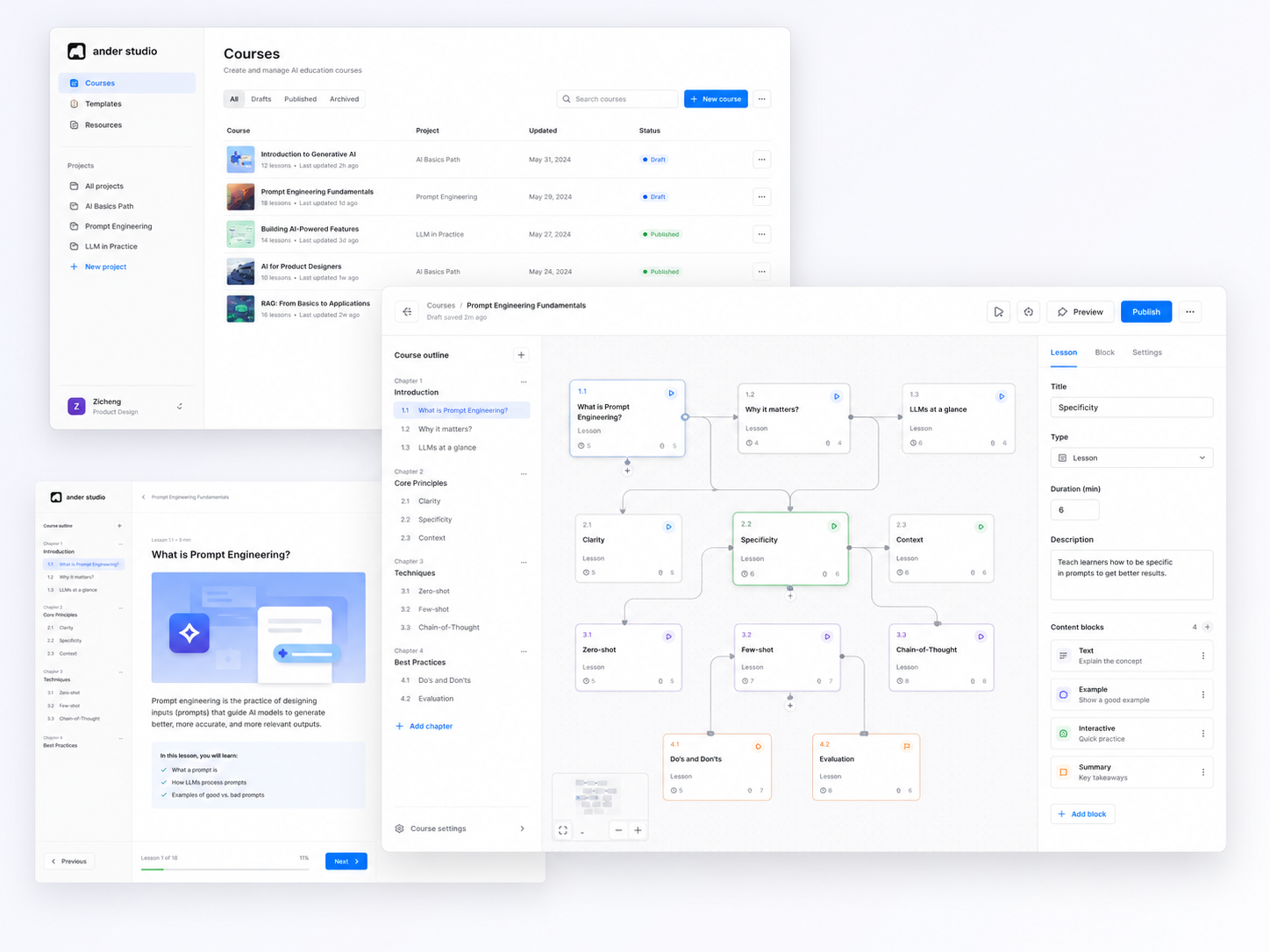
ANDER STUDIO
Redesigning an internal course-authoring platform for faster, clearer course creation
Ander Studio is an internal authoring platform used by learning creators to build interactive enterprise training courses. We redesigned its fragmented and cognitively demanding workflow into a more visual, collaborative system that supports ideation, course mapping, and detailed editing in one place.
Timeline
12 Weeks Group Project
Client
Ander, an enterprise EdTech startup
My Role
UX/UI Design, Interaction Design
Methods
Secondary Research, Primary Research, Prototyping, Usability Testing
Deliverables
Persona, UX Research, Experience Maps, User Flow, UX Wireframe, Interactive Prototype, Visual Design and Usability Testing
Project Scope
Projects Dashboard, Shared Materials, Course Planning, Contextual Editing, Branching and Preview
Project Background
This is a graduate Capstone project at the University of Toronto (iSchool) in collaboration with Ander, an EdTech startup that builds training systems for enterprise clients like Hyundai. We redesigned Ander Studio, their internal platform used by creators to build interactive training courses.
Ander's internal team stopped using their own tool. Because the platform was clunky and confusing, creators did 80% of their early work in external tools like Canva. This fragmented workflow caused data loss, manual errors, and delayed client deliveries.
The main system issues were:
High Brainpower Needed: The canvas forced a messy "one question per node" view, forcing creators to memorize complex branching paths by heart.
No Collaboration or Safety: The system lacked built-in comments, autosave, and version history, making team reviews highly inefficient.
To move from local updates to a systemic restructuring. My goal was to bring ideation and execution into one unified system, reducing cognitive load and removing workflow friction.

Secondary Research
Before speaking with Ander’s internal creators, we conducted secondary research to understand whether the team’s challenges were unique to the platform or reflected broader changes in digital course creation.
We reviewed patterns in modern authoring tools, microlearning systems, and collaborative SaaS products. The research gave us an initial set of design considerations, which we later compared with evidence from user interviews
1. The Shift Toward Microlearning
Corporate learning is increasingly delivered through shorter, more interactive, and non-linear experiences. While individual learning units may be smaller, creators still need to manage modules, panels, feedback states, and branching paths.
Many traditional authoring tools were designed around linear course structures, making complex learning journeys difficult to understand and maintain.
Impact on the design
The redesigned experience needed to support non-linear content without displaying every question and connection at once. This encouraged us to explore a clearer hierarchy between the overall course, modules, panels, and individual interactions.
Initial design consideration
Show structure before detail.
2. Rising Expectations for Creation Tools
Modern creators are accustomed to visual and collaborative tools such as Canva and Figma. These products use familiar patterns including direct manipulation, contextual controls, clear hierarchy, and immediate feedback.
When enterprise software relies on dense forms, technical language, and hidden system states, users must spend more effort learning the interface before they can focus on creating content.
Impact on the design
Reducing the initial learning curve became an important design priority. We explored familiar interaction patterns and progressive disclosure so that essential actions remained easy to recognize while advanced functionality appeared only when relevant.
Initial design consideration
Make the next action recognizable.
3. The Cost of Workflow Friction
When planning and implementation happen in separate tools, creators must manually transfer more than text. They also need to recreate layouts, content relationships, feedback, and structural decisions across systems.
This creates duplicated work and increases the risk of inconsistent versions, missing context, and implementation errors.
Impact on the design
The redesign needed to connect early planning, course mapping, detailed editing, and team review within one authoring environment. The goal was to reduce unnecessary tool switching and preserve context throughout the course-creation process.
Initial design consideration
Minimize tool switching and preserve context.
Primary Research
User Interviews
To pinpoint the root causes of declining engagement, We conducted qualitative research through deep-dive interviews with 6 internal participants. I prioritized qualitative insights over quantitative data because I needed to understand the "emotional friction"—the specific moments where designers felt so frustrated that they abandoned Ander Studio for external workarounds.
Why we did it:
Startup Context: Ander is a growing startup, and the internal platform (Ander Studio) has a small, highly specific group of users. Sending out a mass quantitative survey wouldn't make sense for this small user base.
Finding the "Root Cause": We needed to understand why creators felt frustrated and "afraid to start". A cold percentage number from a survey couldn't show us their emotional stress. By talking to them directly, we uncovered their real habits—like how they relied on memory to track paths and why they felt forced to use external tools.
Interviews allowed us to map out the current internal workflow and identify where the system failed to meet professional design standards. To ensure a comprehensive view, the respondents were selected based on the following internal roles/criteria:
Content Designers who use the platform daily to build modules for clients like Hyundai.
Operations Managers who oversee the end-to-end course delivery process.
Learning Content Creators who focus on the pedagogical logic and quiz structures.
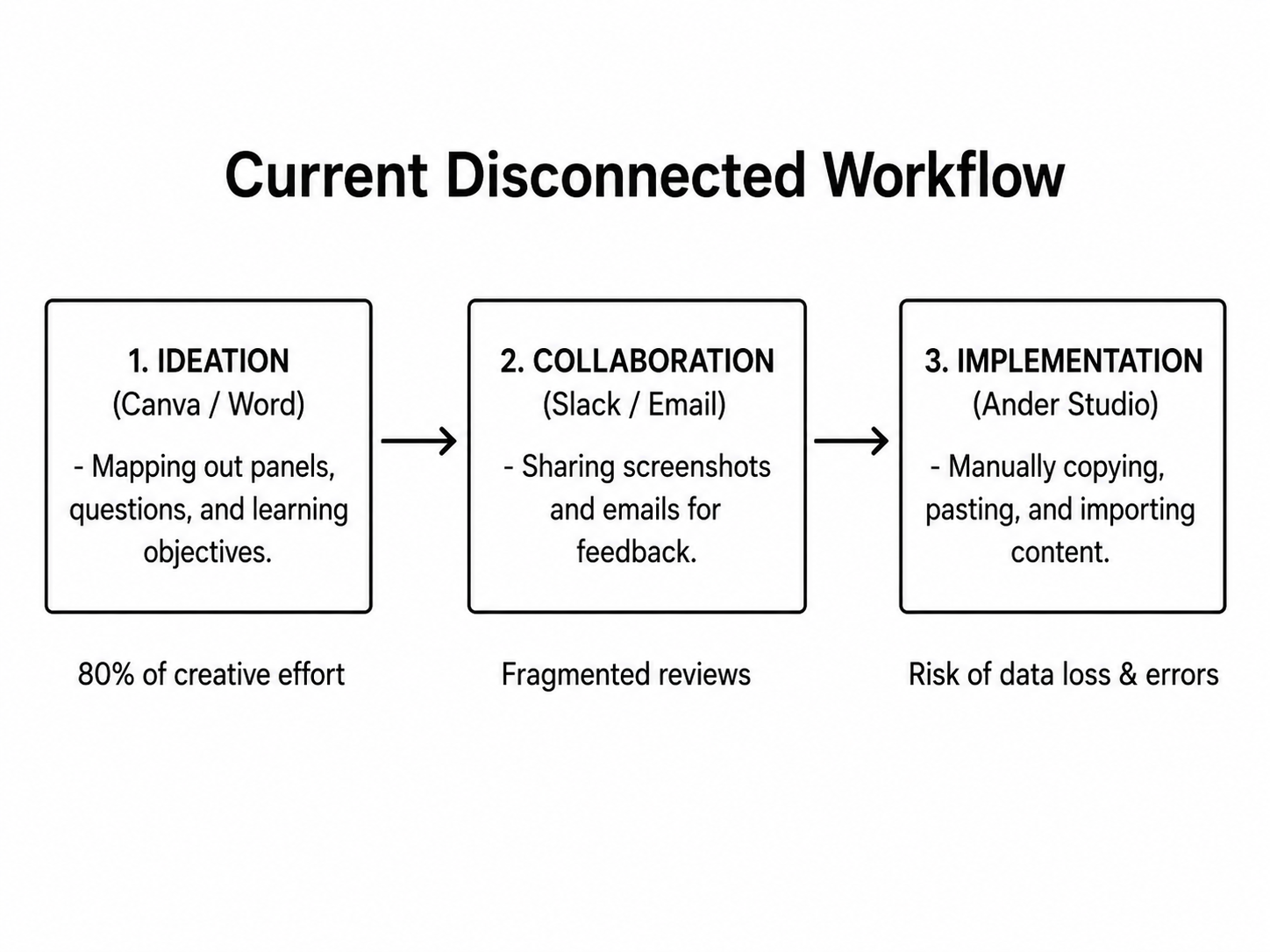
Figure 1. Current Workflow Mapping
Creators moved repeatedly between Canva, messaging tools, shared folders, and Ander Studio before implementation.
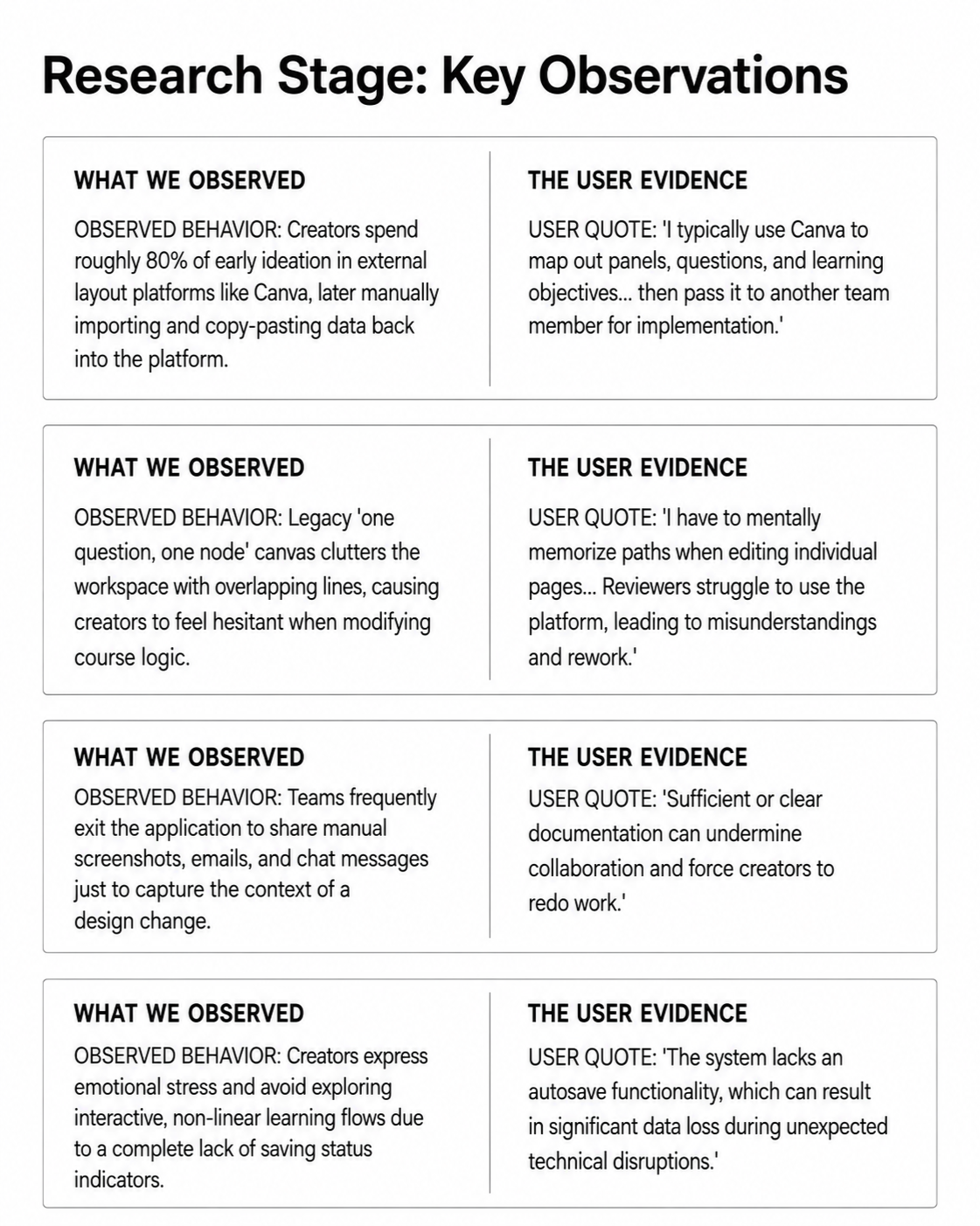
Figure 2. Interview Synthesis
Recurring observations revealed friction around tool switching, branching visibility, collaboration, and editing confidence.
Through our in-depth interviews with 6 core stakeholders and internal playback sessions, we collected direct evidence of how users interact with the current platform:
By documenting these specific observations, we didn't just list user complaints; we gathered concrete evidence of user workarounds and emotional friction points. This factual foundation ensured that our subsequent system insights were directly rooted in real-world behaviors rather than product assumptions.
Translating Research Into Design Strategy
When analyzing our research, we carefully separated the concrete behaviors we observed from the underlying product insights we developed as a team. This logical progression guided our final design decisions:
Creators were not leaving Ander Studio simply because Canva looked better. They were leaving because Ander Studio required detailed implementation decisions before they had finished thinking through the course structure.
The external-tool workaround revealed a mismatch between the system and the creators’ natural workflow: creators think spatially and iteratively during early ideation, while Ander Studio asked them to work through rigid form fields and technical configuration immediately.
The opportunity was therefore not merely to make Ander Studio more visually appealing, but to let users move gradually from rough structure to detailed implementation without changing tools.
We translated recurring user behaviors into product insights, design principles, and concrete design decisions.
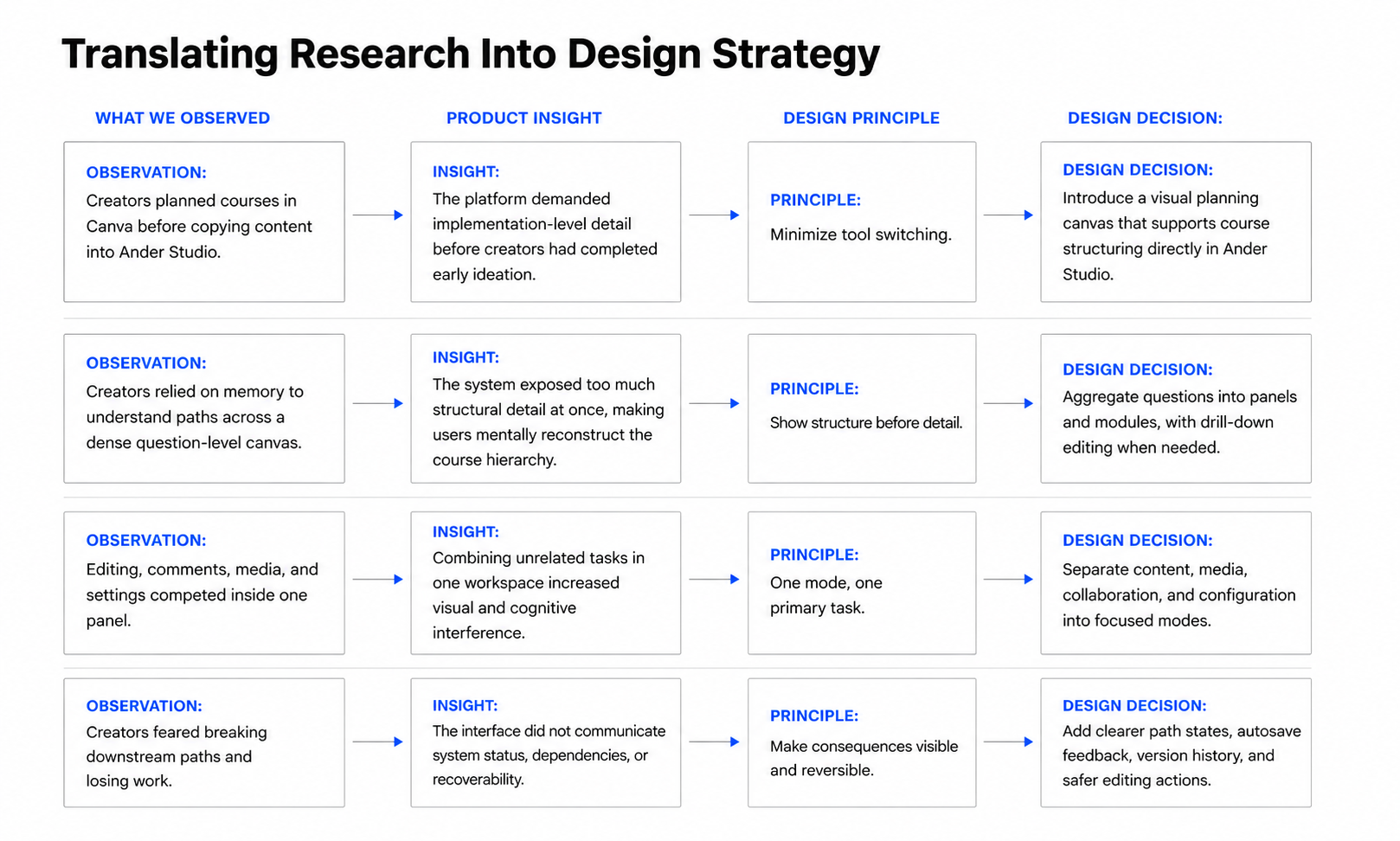
Design Principles
01. Minimize tool switching
Support planning, structuring, editing, and reviewing within one connected workflow so creators do not need to repeatedly transfer content between external tools and Ander Studio.
02. Show structure before detail
Present the high-level course journey first, then progressively reveal question-level content and technical settings only when they become relevant.
03. Keep each workspace focused
Give each interaction mode a clear primary purpose. Content editing, media management, collaboration, and configuration should not compete for attention within the same panel.
04. Make complex systems feel safe
Help creators understand where they are, what will change, and whether actions can be recovered. System status, path relationships, autosave, and version history should remain visible and predictable.
Design Stage
The V0 Concept Sketch
Hypothesis
Separating high-level course planning from detailed editing could reduce cognitive load and help creators focus on one level of information at a time.
What We Tested
Simplified course-planning canvas
Right-side editing panel
Basic Projects Dashboard
Shared Materials library
Search and mobile preview
-
![]()
Explanation
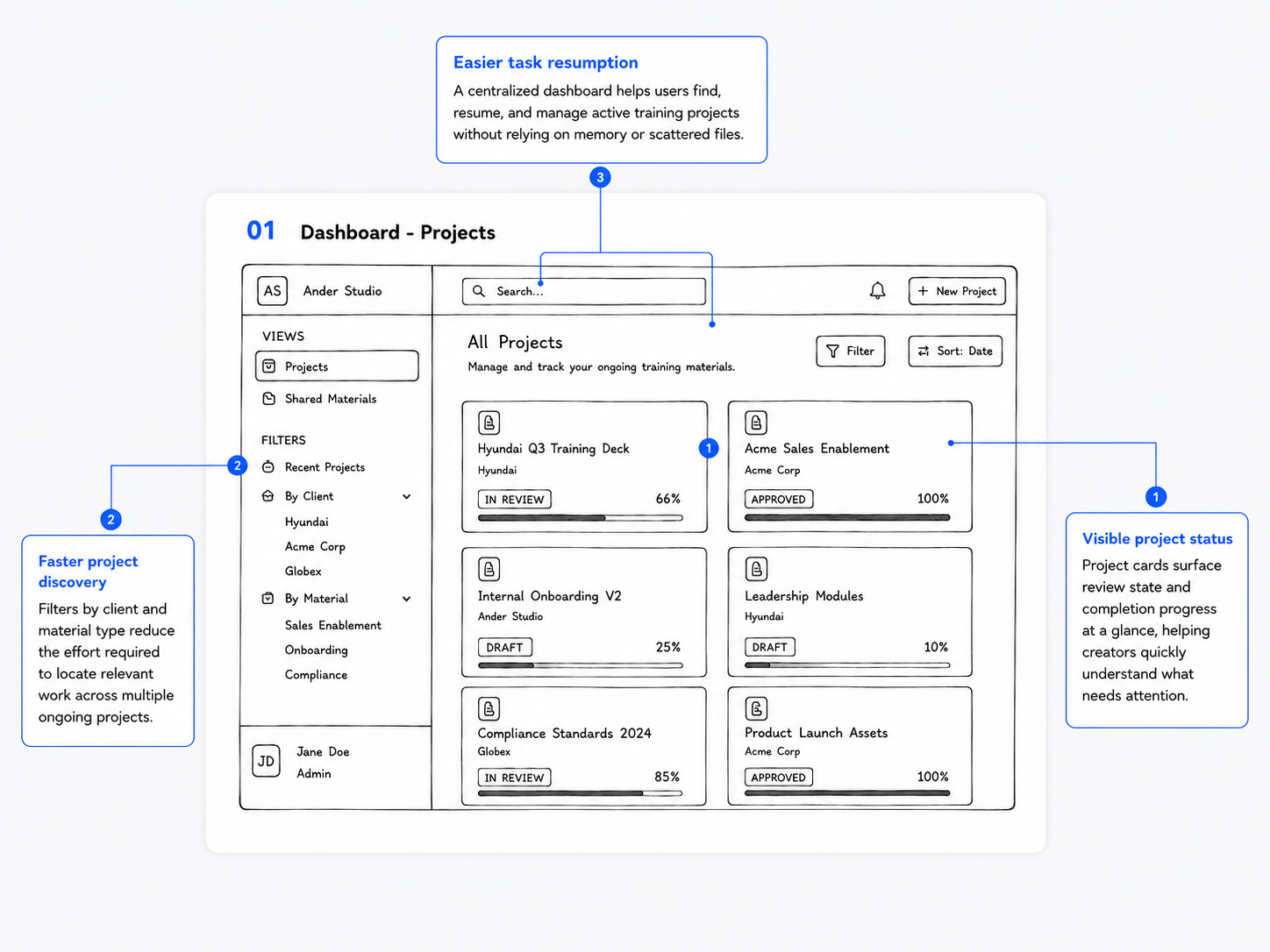
The dashboard centralizes active projects and shows progress, review status, and client information at a glance. Filters help creators quickly locate and resume relevant work.Design principle
Show structure before detail — users see the overall project landscape before opening a course.
Make consequences visible and reversible — visible status and progress clarify what needs attention. -
![]()
Explanation
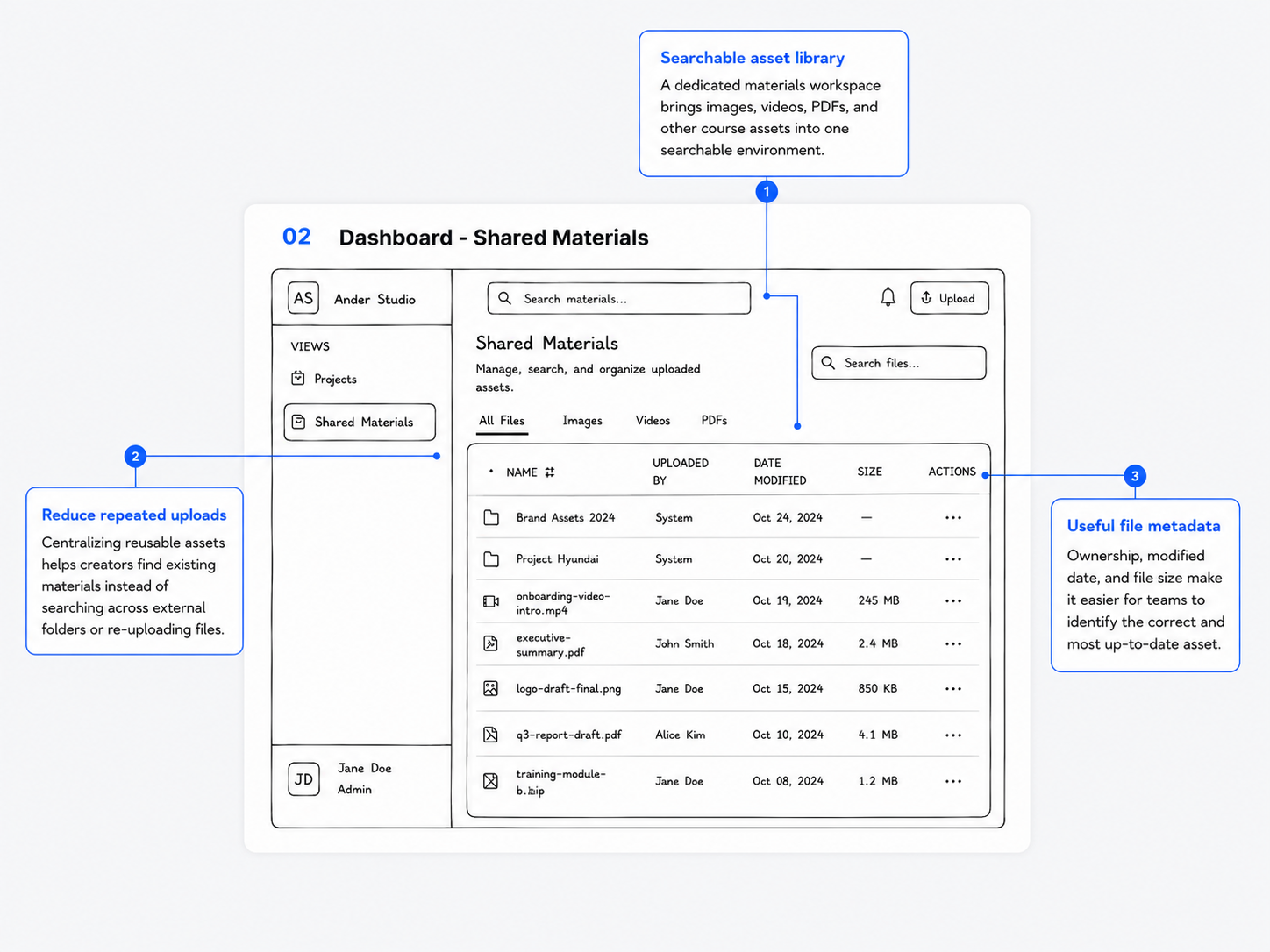
The shared library brings images, videos, PDFs, and other reusable assets into one searchable workspace, reducing duplicate uploads and external file searching.Design principle
Minimize tool switching — creators can find and manage assets without leaving Ander Studio.
Show structure before detail — materials are organized by type before detailed metadata is shown. -
![]()
Explanation
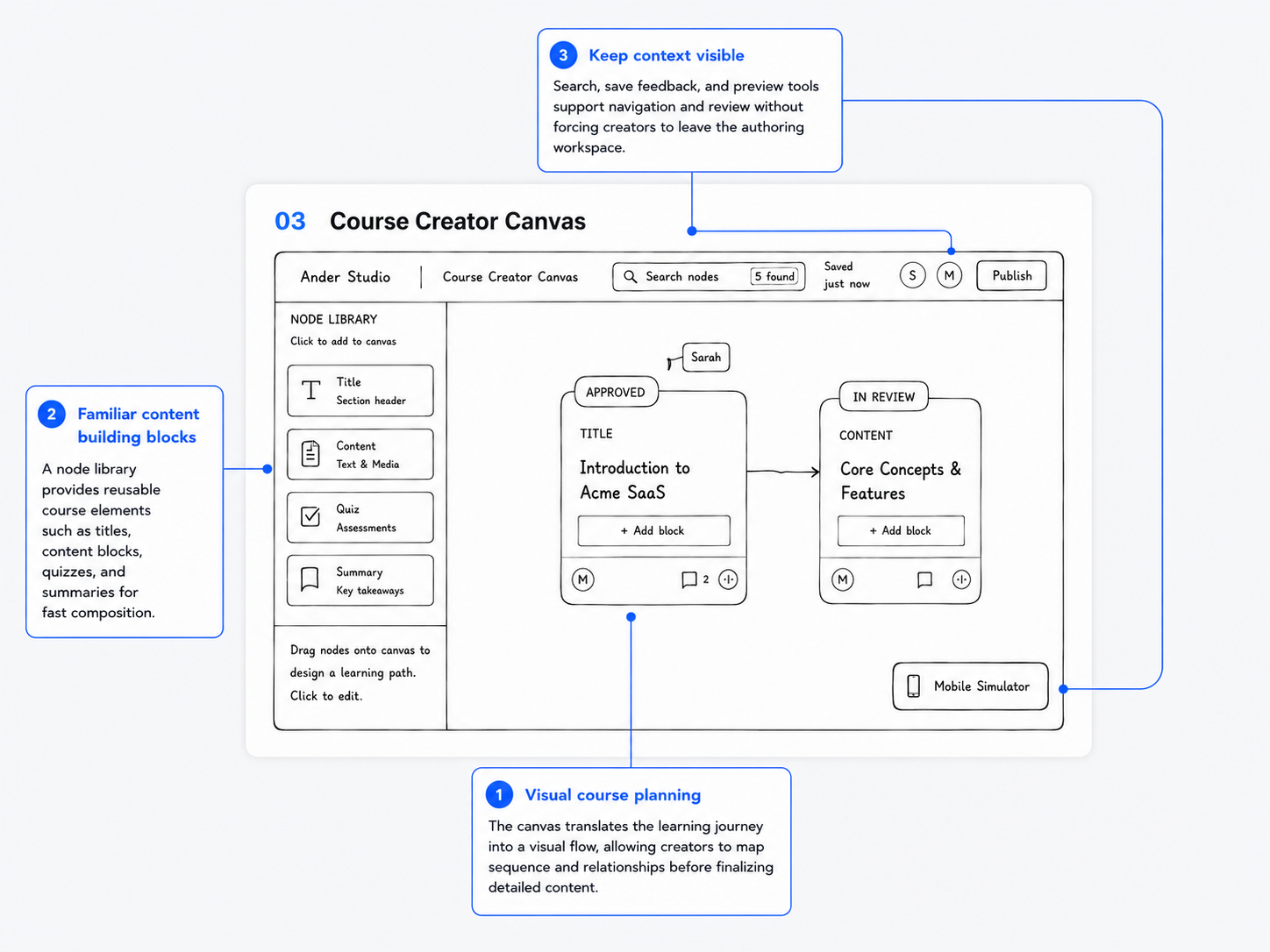
The visual canvas lets creators map the learner journey using reusable content blocks before completing detailed content and settings.Design principle
Minimize tool switching — early planning can happen directly in Ander Studio instead of Canva.
Show structure before detail — creators define the course flow before editing individual content. -
![]()
Explanation
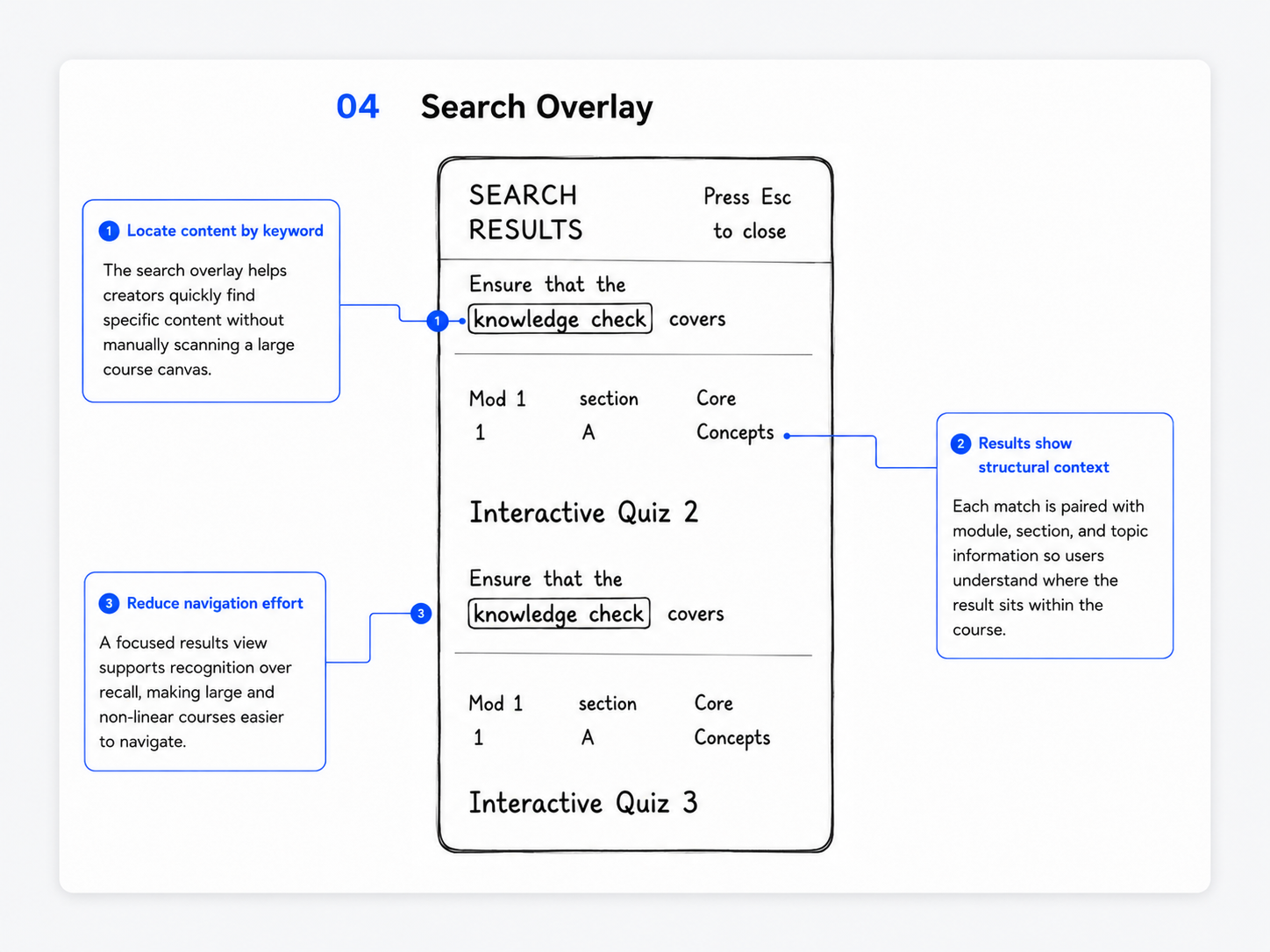
The search overlay helps creators locate specific content by keyword while showing its module, section, and topic context.Design principle
Show structure before detail — each detailed result remains connected to the larger course hierarchy. It also supports recognition over recall by reducing dependence on memory. -
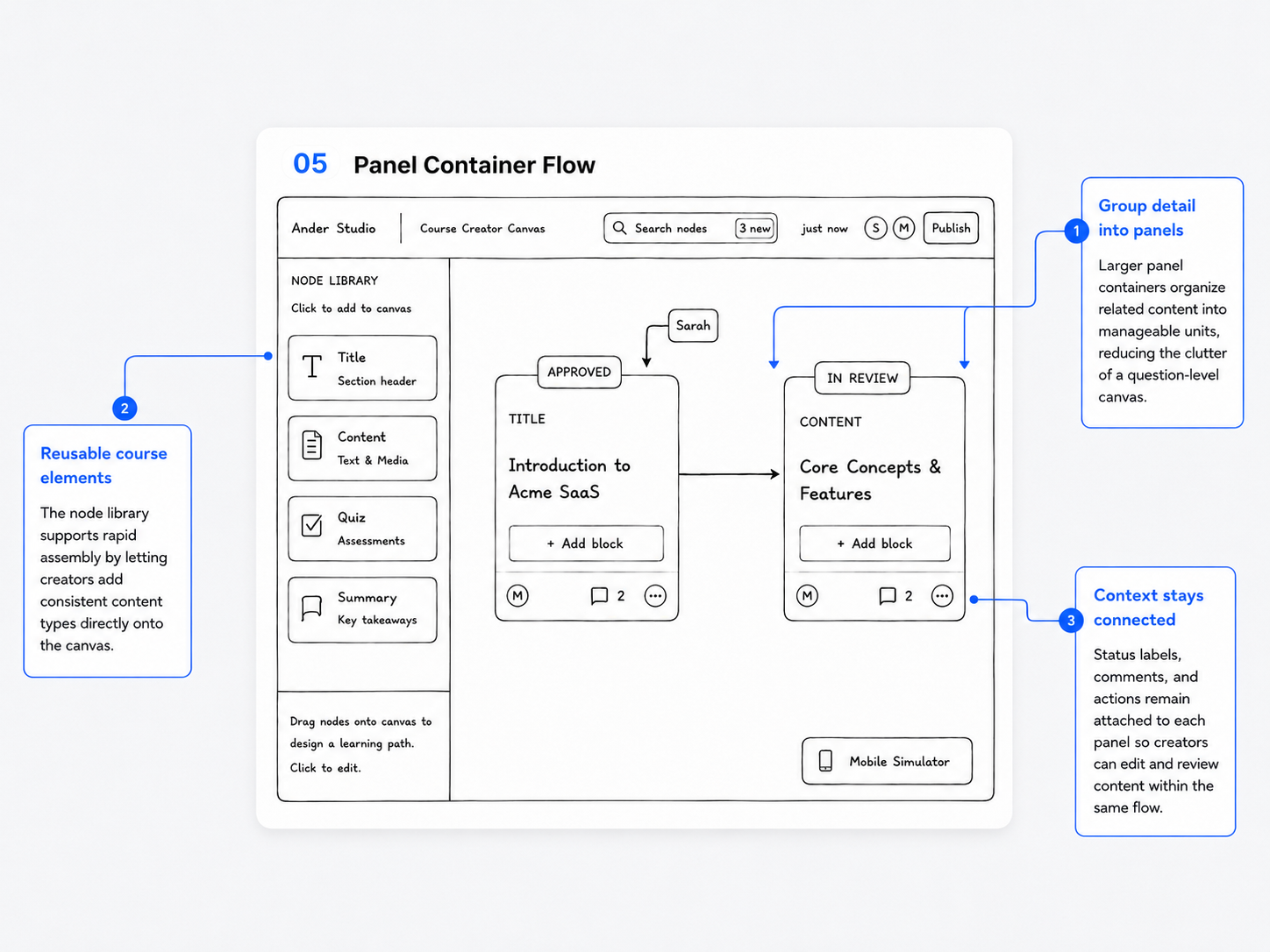
![]()
Explanation
Related questions and interactions are grouped into larger panel containers, reducing clutter on the question-level canvas. Status and comments remain attached to each panel.Design principle
Show structure before detail — creators first see panels, then drill into individual content.
This version also revealed the need for One node, one primary task, because editing, comments, and settings still competed in one workspace. -
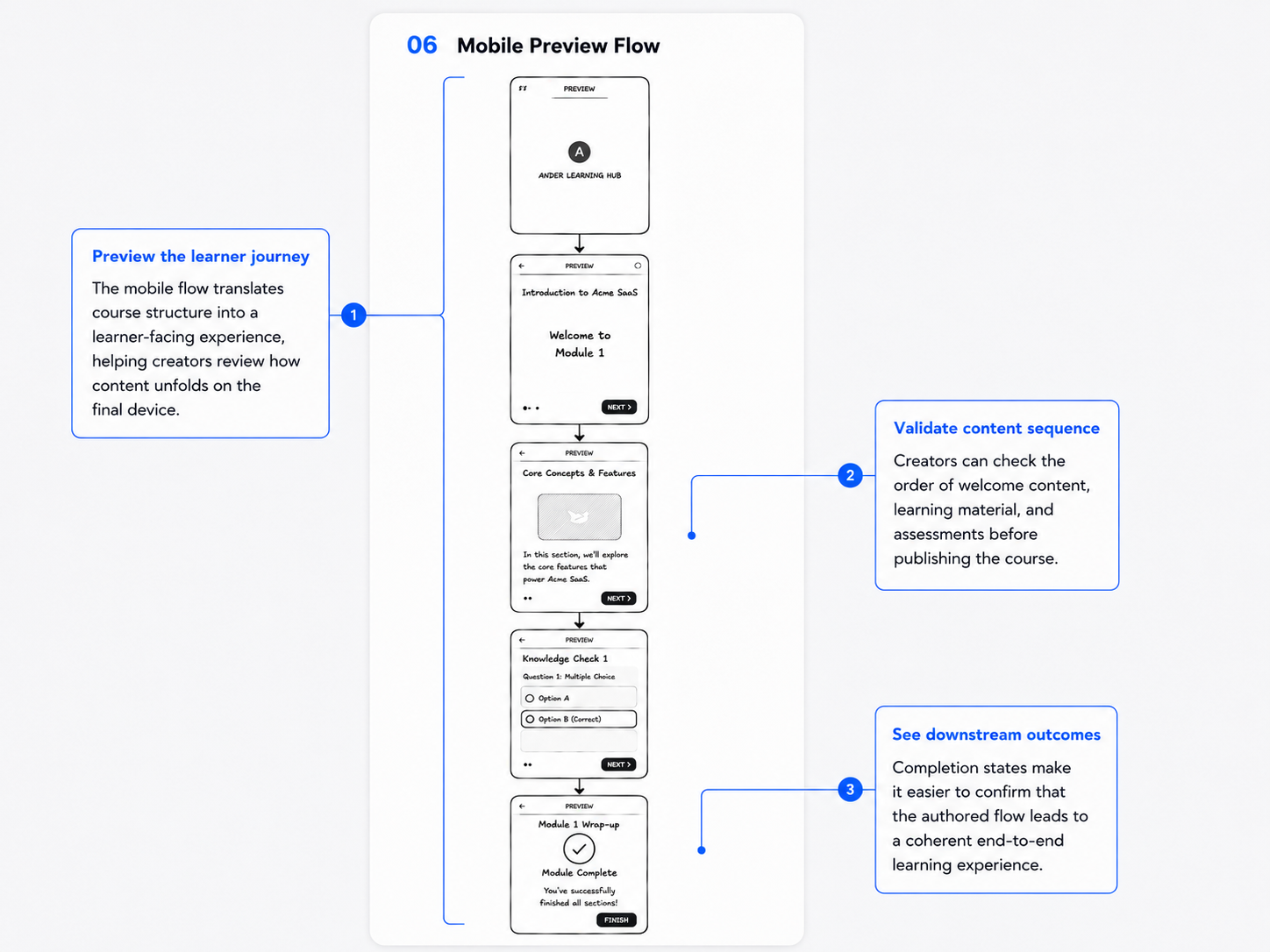
![]()
Explanation
The mobile preview shows how the authored course will appear to learners, from introduction and content to assessment and completion.Design principle
Make consequences visible and reversible — creators can see the downstream impact of their decisions before publishing.
Show structure before detail — the macro canvas is translated into a detailed learner-facing sequence.
What We Learned
Creators responded positively to the cleaner macro-to-micro structure. However, concentrating content editing, media, comments, and settings inside one universal side panel created a new source of complexity.
How It Informed the Next Iteration
We shifted from a universal editor toward more focused work modes, contextual controls, and safer structural editing.
V0 Key Takeaway
V0 reduced structural complexity but revealed unresolved functional complexity.
Testing & Iteration Phase — V1 and V2
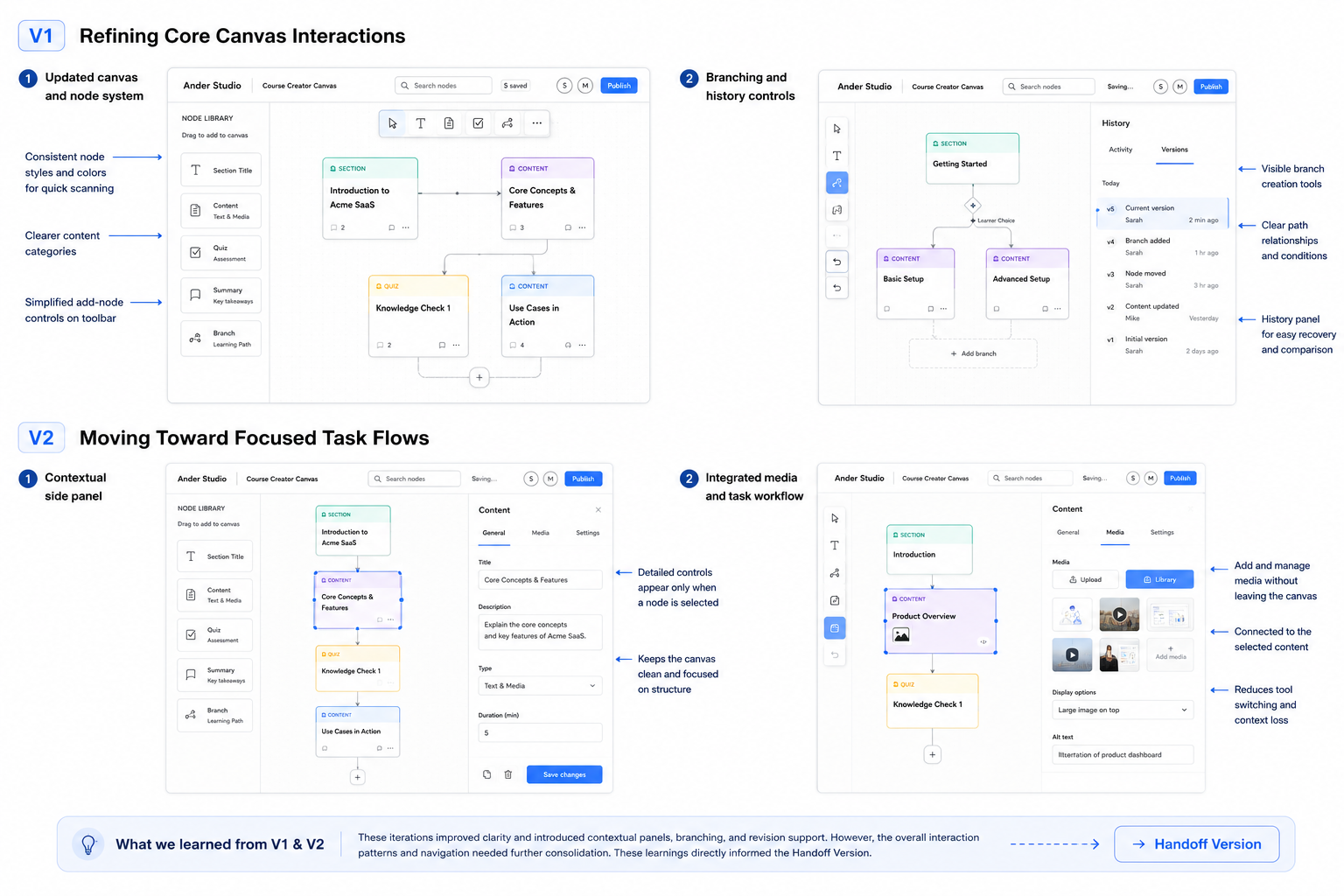
Hypothesis
Breaking complex authoring tasks into focused interaction states would reduce interface density while preserving efficient navigation.
V1:What Changed
We refined node styles, content categories, branching controls, and revision history.
V2:What Changed
We tested contextual editors, task-specific panels, and integrated media workflows.
What Improved
The course structure became easier to scan, and users encountered fewer unrelated controls at one time.
What Still Needed Refinement
Navigation between planning, content editing, media, and collaboration still lacked one consistent interaction model.
How It Informed the Handoff Version
The final design needed a consistent separation between early planning and task-specific production, rather than only clearer individual controls.
Usability Testing
Goal
Evaluate whether the redesigned workflow improved task clarity, navigation, and perceived cognitive load.
What We Tested
Creating a new course
Editing branching logic
Finding and modifying existing content
Collaborating with teammates
Key Findings
Users understood the new workspace hierarchy more quickly.
Navigation required less memorization.
Contextual editing reduced the number of unrelated controls visible at once.
Some toolbar actions and transitions still required clearer feedback.
Changes After Testing
Clarified selected-node states
Simplified toolbar hierarchy
Improved transitions between planning and editing
Strengthened save and status feedback
Kept secondary actions visually separate from the main task
The Final Handoff Version
What is the final solution?
The Handoff Version introduces a progressive course-authoring workflow that separates early planning from detailed production. Creators can first sketch a lightweight Mini Map, then move into contextual editing modes for content, media, assessments, and collaboration while keeping the broader course structure visible.
-
![]()
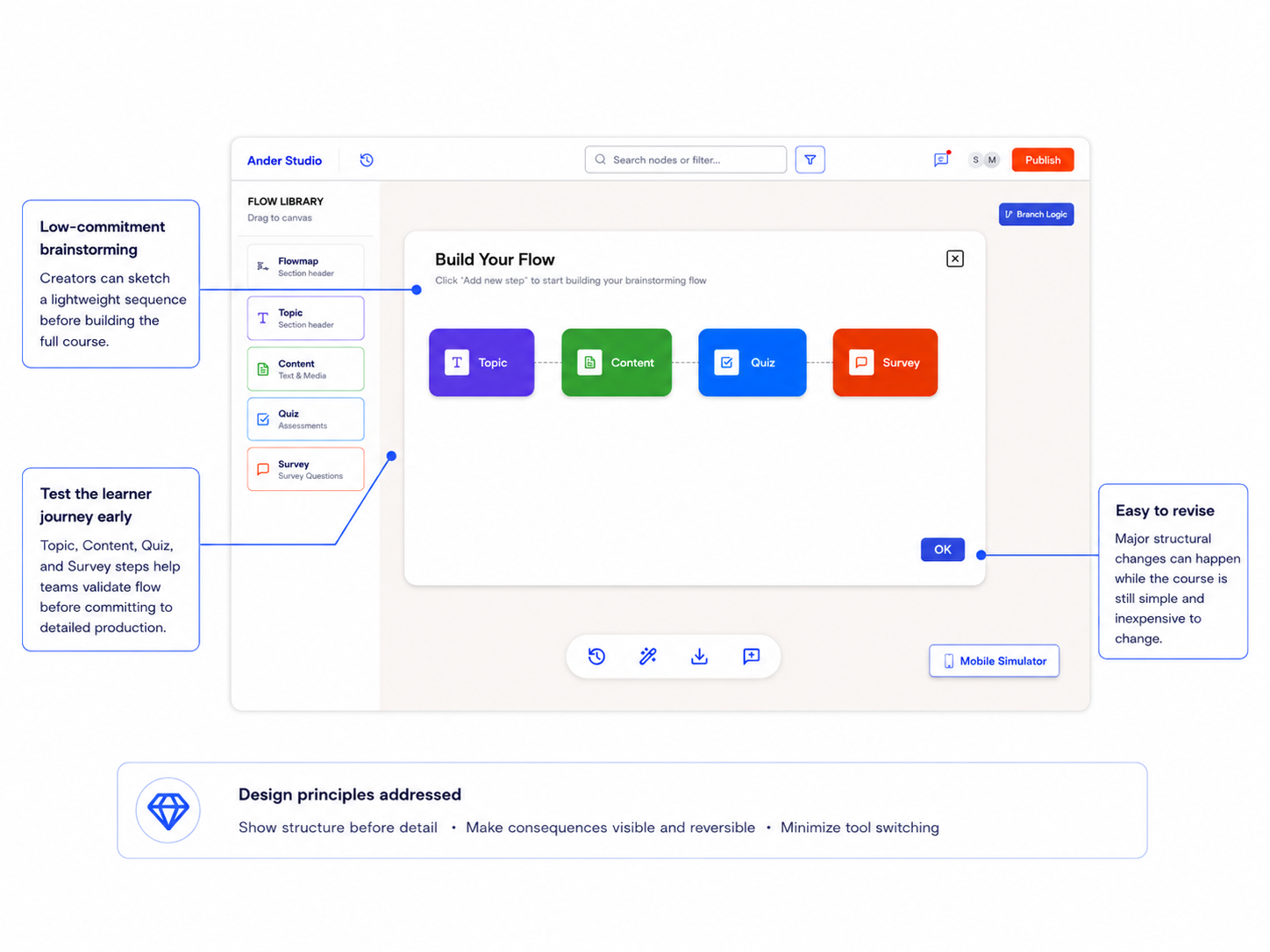
Explanation
The Mini Map gives creators a low-commitment space to brainstorm the learner journey using simple Topic, Content, Quiz, and Survey steps. They can test the sequence, identify missing content, and reorganize the course while the structure is still easy to change.How It Improves on V0
In V0, creators moved directly from the canvas into building full course nodes, which required detailed structural and implementation decisions too early. The Handoff Version introduces a lightweight planning stage before production, reducing early cognitive load and preventing costly rework later.
Design Principles Addressed
Show structure before detail
Creators establish the overall sequence before entering detailed content and configuration.
Make consequences visible and reversible
Structural decisions become visible early, when steps are still easy to rearrange or remove.
Minimize tool switching
Early brainstorming can happen directly inside Ander Studio instead of Canva.
-
![]()
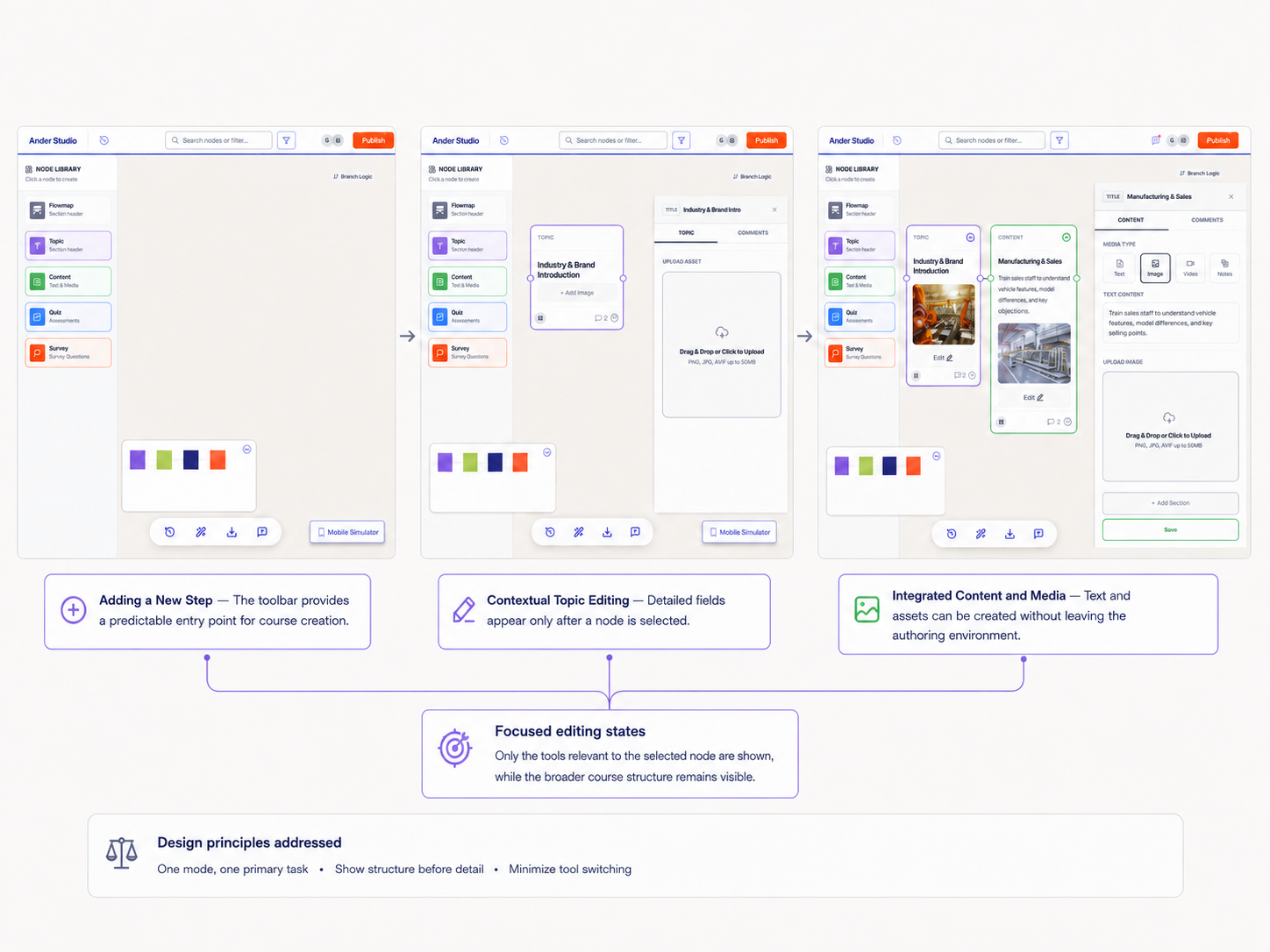
Explanation
Once the course structure is established, creators can select a node and complete its detailed content inside a contextual editor. Topic, Content, Quiz, and Survey nodes each reveal task-specific controls, while the surrounding course flow remains visible.How It Improves on V0
V0 placed content editing, media, comments, and settings inside one universal side panel. Although this reduced canvas clutter, it created a new source of complexity.
The Handoff Version replaces the universal panel with focused editing states that reveal only the tools required for the selected node.
Design Principles Addressed
One mode, one primary task
Each editor focuses on one content type and one primary activity.
Show structure before detail
Detailed fields appear only after the creator selects a specific node.
Minimize tool switching
Text, media, quizzes, and surveys can be created without leaving the authoring environment.
-
![]()
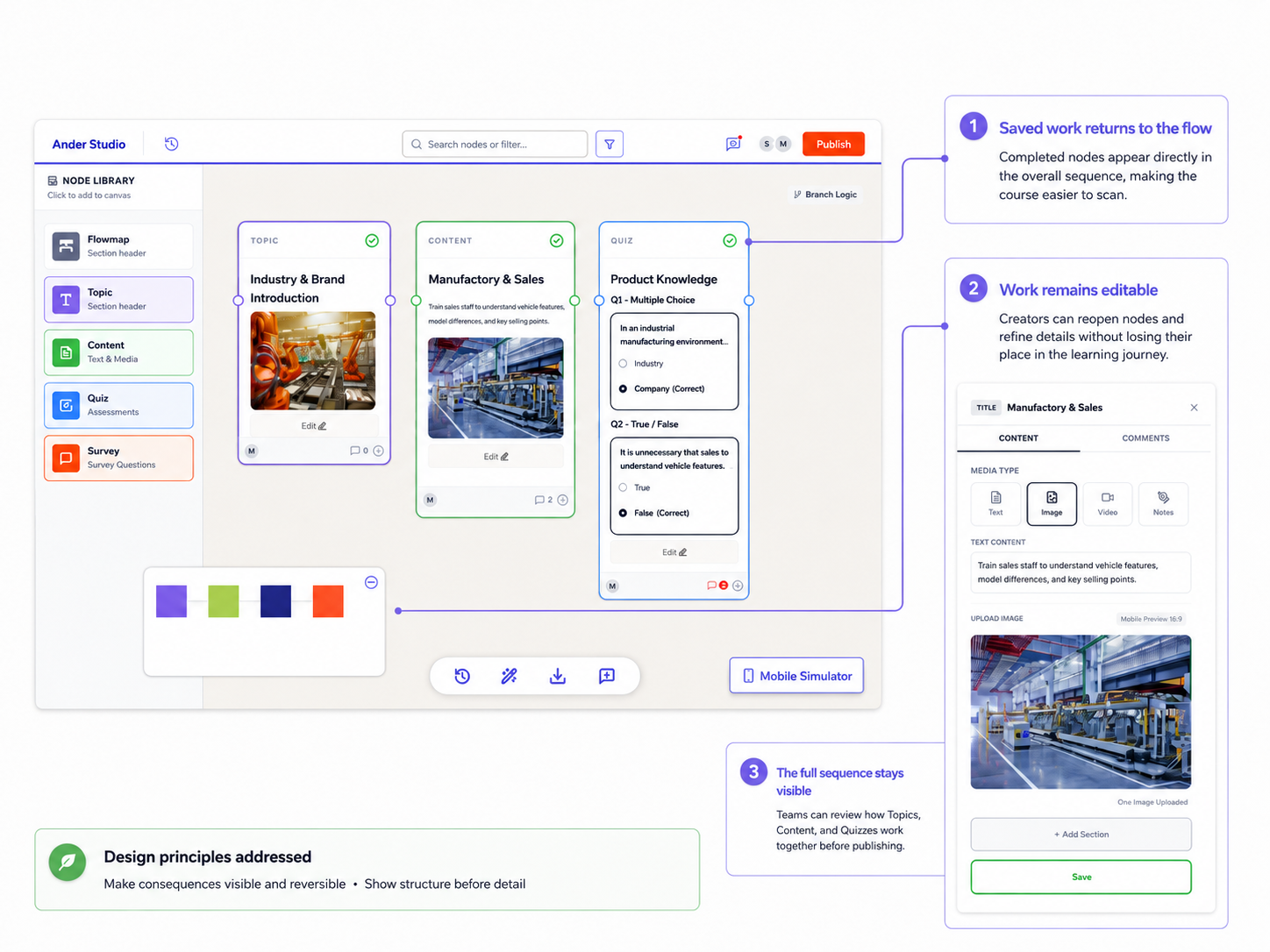
Explanation
After saving, completed nodes return directly to the course flow. Creators can review how individual steps work together, reopen content for further editing, inspect branching relationships, and preview the learner-facing experience before publishing.How It Improves on V0
In V0, detailed edits and the overall learning journey were less clearly connected. Creators could make changes, but the downstream impact of those changes was not always easy to understand.
The Handoff Version keeps completed work visible within the full sequence and provides clearer ways to review, revisit, and preview decisions.
Design Principles Addressed
Make consequences visible and reversible
Saved changes, history, branching visibility, and preview make the impact of editing decisions easier to understand and revisit.
Show structure before detail
Creators return from detailed editing to a scannable view of the complete learner journey.
What We Validated
Prototype testing focused on whether creators could understand the new workspace hierarchy, begin a course, locate existing content, and move between planning and detailed editing.
Key Findings
Participants understood the macro-to-micro workflow more quickly and relied less on memory when navigating the course.
Contextual editors reduced the number of unrelated controls visible during each task.
Some toolbar labels and transitions between planning and editing still required clearer feedback.
Changes Before Handoff
Based on the feedback, we clarified selected-node states, simplified the toolbar hierarchy, strengthened save feedback, and kept secondary actions visually separate from the main task.
The Handoff Version shifts Ander Studio from an implementation-first tool to a progressive authoring workflow. Creators can think broadly through the Mini Map, move into focused production through contextual editors, and review the complete learner journey before publishing.
Reflection
What Worked
Separating lightweight planning from detailed production created a clearer macro-to-micro workflow. The Mini Map gave creators a low-commitment space to organize the learner journey, while contextual editors helped them focus on one task without losing sight of the broader course structure.
What Did Not Work Initially
V0 reduced canvas clutter, but it concentrated content editing, media, comments, and settings inside one universal side panel. This solved structural complexity while creating a new layer of functional complexity.
What I Learned
I learned that simplifying a complex product is not only about removing controls. It also requires sequencing complexity so users encounter the right level of detail at the right moment. I also learned that focused work modes are only effective when users can move between planning and editing without losing context.
What Remains to Validate
The Handoff Version would benefit from longer-term testing with real course-production projects, particularly around large branching structures, version recovery, collaboration across roles, and how easily creators move between the Mini Map and detailed editing.
Closing Takeaway
The strongest design shift was moving Ander Studio from an implementation-first tool to a progressive authoring workflow that supports creators from early thinking through detailed production.